Data Transmission
What is data transmission?
Data transmission is the process of transferring data from one device to another using a wired or wireless connection
Wired data transmission can be completed in two ways:
Serial
Parallel
Serial & Parallel Transmission
Serial & Parallel Transmission
What is serial & parallel transmission?
Serial and parallel are methods of transmitting data (bits) from a sender to a receiver
Each method determines how many bits can be transmitted at once
Serial transmission
A stream of bits is sent in sequence, one after the other, along a single wire
USB is an example of a wired serial connection

Parallel transmission
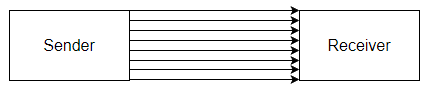
Multiple bits are sent simultaneously, with each bit travelling on its own separate wire
Parallel transmission is usually synchronous, using a clock signal to keep data aligned
However, bits can arrive at slightly different times due to skew (timing differences between wires)
A traditional printer cable is an example of a wired parallel connection
Advantages and disadvantages of serial & parallel transmission
Transmission | Advantages | Disadvantages |
|---|---|---|
Serial |
|
|
Parallel |
|
|
Simplex, Half-Duplex & Full-Duplex Transmission
Simplex, Half-Duplex & Full-Duplex Transmission
What is simplex, half-duplex & full-duplex transmission?
Simplex, half-duplex and full-duplex describe the direction in which data can be transmitted between a sender and receiver
Simplex transmission
Data travels in only one direction
Sending data from a computer to a monitor is an example of simplex transmission
Half-duplex transmission
Data can travel in both directions, but only one direction at a time
A printer cable which waits for the data to be received before sending back a ‘low ink’ message is an example of half-duplex transmission
Full-duplex transmission
Data can travel in both directions at the same time
Network cables can send and receive data at the same time and are examples of full-duplex data transmission
Full-duplex is used in local and wide area networks
Advantages and disadvantages of simplex, half-duplex & full-duplex transmission
Transmission | Advantages | Disadvantages |
|---|---|---|
Simplex |
|
|
Half-duplex |
|
|
Full-duplex |
|
|
Wires can be combinations of serial, parallel, simplex, half-duplex and full-duplex
Simplex | Half-duplex | Full-duplex | |
|---|---|---|---|
Serial | Serial-Simplex | Serial-Half-duplex | Serial-Full-duplex |
Parallel | Parallel-Simplex | Parallel-Half-duplex | Parallel-Full-duplex |
Serial-Simplex
Data is transmitted one bit at a time in one direction only on a single wire
Serial-Half-duplex
Data is transmitted one bit at a time, and can flow in both directions, but not at the same time
This typically uses a single shared wire.
Serial-Full-duplex
Data is transmitted one bit at a time in both directions simultaneously, but this requires two wires, one for each direction.
Parallel-Simplex
Multiple bits are transmitted simultaneously in one direction only, using multiple wires
Parallel-Half-duplex
Multiple wires send multiple bits of data in both directions, but only one direction at a time
Parallel-Full-duplex
Multiple wires send multiple bits of data in both directions simultaneously