StudyDeck

Composite Functions

Exam code: 4037
Written by: Ashika|Reviewed by: Caroline Carroll|Updated 2 July 2026

Composite Functionsvideo

Composite Functions

Composite functions

What is a composite function?

  • A composite function is where one function is applied after another function

Composite function fg(x) applies g first then f
  • The ‘output’ of one function will be the ‘input’ of the next one

  • Sometimes called function-of-a-function

  • A composite function can be denoted

    •  fg(x){"language":"en","fontFamily":"Times New Roman","fontSize":"18","autoformat":true}

    •  f(g(x)){"language":"en","fontFamily":"Times New Roman","fontSize":"18","autoformat":true}

    • All of these mean “f{"language":"en","fontFamily":"Times New Roman","fontSize":"18","autoformat":true} of g(x){"language":"en","fontFamily":"Times New Roman","fontSize":"18","autoformat":true}”

Composite functions as function machines


How do I work with composite functions?

Notation for composite functions
  • Recognise the notation

    • fg(x){"language":"en","fontFamily":"Times New Roman","fontSize":"18","autoformat":true} means “f of g of x”

    The order matters

    • First apply g{"language":"en","fontFamily":"Times New Roman","fontSize":"18","autoformat":true} to x{"language":"en","fontFamily":"Times New Roman","fontSize":"18","autoformat":true} to get g(x){"language":"en","fontFamily":"Times New Roman","fontSize":"18","autoformat":true}

    • Then apply f{"language":"en","fontFamily":"Times New Roman","fontSize":"18","autoformat":true} to gx{"language":"en","fontFamily":"Times New Roman","fontSize":"18","autoformat":true} to get f(g(x)){"language":"en","fontFamily":"Times New Roman","fontSize":"18","autoformat":true}

    • Always start with the function closest to the variable

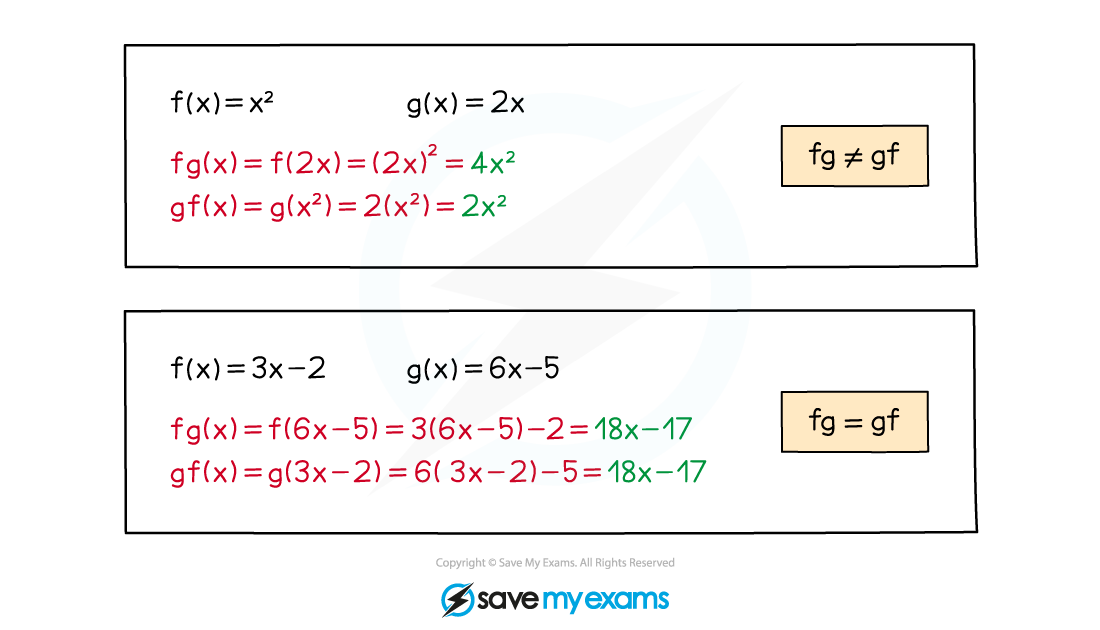
    • fg(x){"language":"en","fontFamily":"Times New Roman","fontSize":"18","autoformat":true} is not usually equal to gf(x){"language":"en","fontFamily":"Times New Roman","fontSize":"18","autoformat":true}

Special cases

  • fgx{"language":"en","fontFamily":"Times New Roman","fontSize":"18","autoformat":true} and gfx{"language":"en","fontFamily":"Times New Roman","fontSize":"18","autoformat":true} are generally different but can sometimes be the same

  • ffx{"language":"en","fontFamily":"Times New Roman","fontSize":"18","autoformat":true} is written as f2(x){"language":"en","fontFamily":"Times New Roman","fontSize":"18","autoformat":true}

    • Note that trig functions are exceptions to this rule

      • e.g. sin2x{"language":"en","fontFamily":"Times New Roman","fontSize":"18","autoformat":true} means sinx2{"language":"en","fontFamily":"Times New Roman","fontSize":"18","autoformat":true} not sinsinx{"language":"en","fontFamily":"Times New Roman","fontSize":"18","autoformat":true}

  • For inverse functions, ff-1x=f-1fx=x{"language":"en","fontFamily":"Times New Roman","fontSize":"18","autoformat":true}

In general fg is a different function to gf

Domain & Range of Composite Functions

Domain & range of composite functions

How do I find the domain and range of composite functions?

  • Use logic to determine the domain and range of a composite function

  • For fgx{"language":"en","fontFamily":"Times New Roman","fontSize":"18","autoformat":true} the first function to be applied will be g{"language":"en","fontFamily":"Times New Roman","fontSize":"18","autoformat":true}

    • So, at best, the domain of fgx{"fontFamily":"Times New Roman","fontSize":"18","autoformat":true,"toolbar":""} will be the same as the domain of gx{"language":"en","fontFamily":"Times New Roman","fontSize":"18","autoformat":true}

  • However, for this to be the case, the range of gx{"language":"en","fontFamily":"Times New Roman","fontSize":"18","autoformat":true} must be contained within the domain of fx{"language":"en","fontFamily":"Times New Roman","fontSize":"18","autoformat":true}

    • If this is not the case, then restrictions on the domain of fgx{"language":"en","fontFamily":"Times New Roman","fontSize":"18","autoformat":true} will be required

  • Similarly, at best, the range of fgx{"language":"en","fontFamily":"Times New Roman","fontSize":"18","autoformat":true} will be the same as the range of fx{"language":"en","fontFamily":"Times New Roman","fontSize":"18","autoformat":true}

    • But if the domain of fx{"language":"en","fontFamily":"Times New Roman","fontSize":"18","autoformat":true} has been affected, the range of fgx{"language":"en","fontFamily":"Times New Roman","fontSize":"18","autoformat":true} will also be affected